
As a franchise or independent car dealer, you know the pressure of managing a marketing budget. When you invest in Google Vehicle Ads (GVA), you expect to see a clear line connecting those ads to cars rolling off your forecourt.
At Localise, we manage GVA campaigns for hundreds of UK dealerships. We see firsthand how incredibly powerful these inventory-driven ads are for driving high-intent buyers straight to your stock. Yet, we also hear a common frustration from Dealer Principals and Marketing Managers:
“The traffic looks great, but our CRM is barely showing any GVA conversions this month. We’re thinking of pausing the campaign.”
If you are looking at your reports and thinking about pulling the plug, stop.
Your ads are almost certainly working. The problem isn’t your marketing performance; it’s a massive digital tracking breakdown known as the Attribution Gap. Because of data privacy laws, mobile habits, and human nature, the modern car-buying journey is full of “blind spots.”
Here are the six main reasons your Google Vehicle Ads are selling cars that your CRM is handing credit to elsewhere.
The 6 blind spots in automotive attribution
1. The “privacy wall” (cookie refusal)
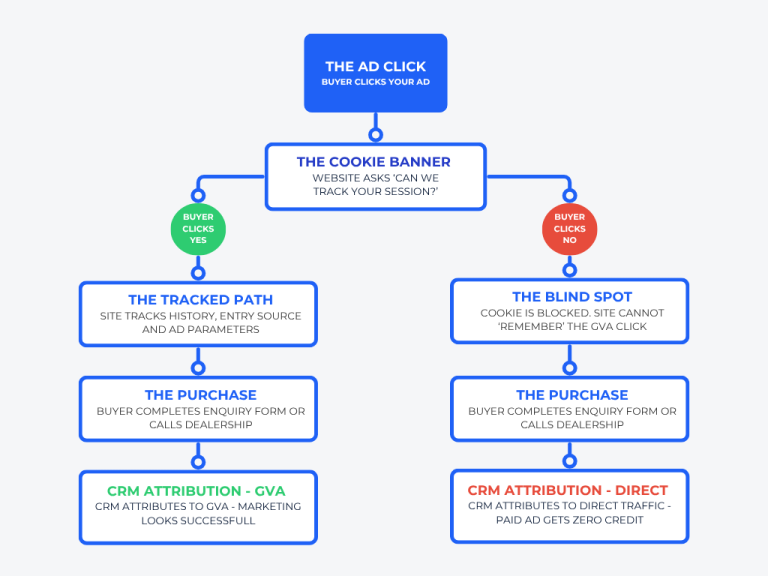
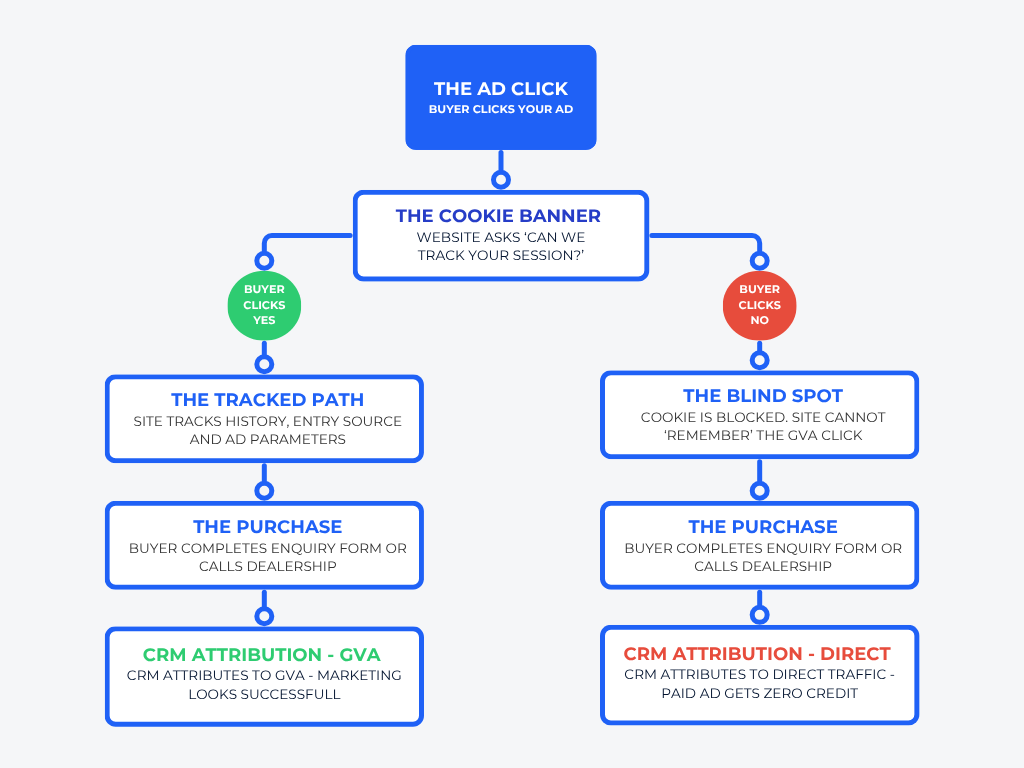
The Journey: A high-intent buyer searches for a vehicle, clicks your GVA, and lands on your stock page. Your website complies with UK regulations and serves a cookie consent banner. The user clicks “Reject All.”
The Problem: Your website is now legally forbidden from “remembering” where that user came from.
The Result: If they fill out an enquiry form or buy that car five minutes later, your site treats them like a total stranger. In your Google Analytics and CRM reports, this highly profitable paid click is masked as “Direct” traffic.
2. The “habitual” caller
The Journey: A mobile user is browsing your inventory via a GVA click while sitting on their sofa. They spot the perfect spec, see your phone number on screen, and want to call immediately. However, instead of tapping the “Click to Call” button, they manually type the number into their landline or a second phone because they prefer dialling by hand.
The Problem: Google can only track a phone conversion if a user triggers the specific digital event handler (the “Click to Call” button) on the screen.
The Result: The phone rings at your reception, but there is no “digital string” connecting that call to the ad. It looks like a “ghost” lead to your marketing team, despite originating directly from GVA.
3. The “big screen” gap (device jumping)
The Journey: A customer is at their office desk or laptop looking closely at your vehicle photos. Because they cannot physically click their desktop monitor to initiate a call, they look at the screen, pick up their mobile phone, and dial your number.
The Problem: There is no physical connection between a computer monitor and a separate telephone line. The desktop browser has no way of telling your analytics platform, “Hey, the user looking at this page just picked up their phone.”
The Result: This is the #1 way car leads are lost in digital reporting. The ad successfully did all the heavy lifting, but the “device jump” completely severed the tracking chain.
4. The “ask the partner” share (dark social)
The Journey: A user clicks your GVA, loves the car, and copies the URL to send to their spouse or partner via WhatsApp, iMessage, or Messenger.
The Problem: When the partner clicks that link on their own phone, they open it in a brand-new browser session. Because modern websites and privacy-focused messaging apps strip tracking parameters (like
gclid) out of URLs, the original tracking code is gone.The Result: The partner calls to book a test drive. Your CRM attributes the lead to “Social Media” or “Direct,” completely ignoring the paid GVA click that initiated the spark.
5. The “i’ll do it tomorrow” tab (idle sessions)
The Journey: A user clicks your ad on Sunday evening, gets distracted by dinner, and leaves the tab open on their phone. Two days later, they reopen their mobile browser and submit an enquiry.
The Problem: Standard analytics tracking sessions automatically expire after just 30 minutes of user inactivity.
The Result: When they finally hit “Enquire” on Tuesday, the website has completely forgotten the original ad click from Sunday. The credit defaults to a regular organic or direct session.
6. The “ghost” walk-in
The Journey: A local buyer searches for a vehicle, clicks your GVA, sees you have the exact model on site, notes your address, closes their phone, and drives straight to your forecourt.
The Problem: They walk onto the lot and deal directly with a salesperson. Unless that salesperson asks, “Did you happen to see our Google Vehicle Ad today?” (and records it precisely),there is no digital trace.
The Result: You sell a car and celebrate a win, but your digital marketing report reads 0 Conversions.
The reality of car buying
Car buyers do not follow linear, easy-to-track paths. They research on laptops, share via chat apps, decline cookies out of habit, and ultimately prefer to call or walk in.
If you judge the success of your Google Vehicle Ads solely on last-click CRM data, you are looking at an incomplete picture. Pausing your campaigns based on flawed data will simply cut off the flow of these highly profitable, ready-to-buy “ghost” leads.
How to better measure your true GVA ROI
Instead of looking at siloed CRM source tracking, focus on holistic operational metrics:
Overall direct and organic traffic volume: Are these rising concurrently with your GVA spend?
Total inbound phone volume: Look at macro call trends rather than just clicked phone links.
Days on market: Watch how quickly your used and new inventory turns over when GVA is active versus when it is paused.
Want a clear, un-compromised look at how Google Vehicle Ads are truly impacting your dealership’s bottom line? Contact the team at Localise today.